

 contact@canrd.com
 +86 18928276992

Details
Bluetooth Badge User Manual
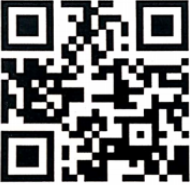
I. Scan the QR code to install the software
II. If you cannot scan the QR code, you can also search for the app to install the software.
1. For Android phones, search for and download "Tencent App Store" on Baidu. Open Tencent App Store, search for "LED display sending software," download and install.
2. For Apple phones, search for "LED Badge" in the App Store, download and install.
3. After successful installation, the app will be displayed as "LED Badge."
III. Editing and Sending Messages
1. Turn on your phone's Bluetooth.
2. Turn on your name tag's Bluetooth (first, press the power button (the first button) to turn on the name tag, then press the power button again to turn on the name tag's Bluetooth; the Bluetooth icon will appear (as shown in Figure 1)). (Note: Automatic pairing is automatic; no need to select a Bluetooth device.)
3. After running the software, you will enter the sending list, which contains 8 messages to be edited.
4. Click the "Settings" button in the lower right corner and check either 11 or 12 (count the number of lights on the name tag vertically and check the corresponding one).
Return to the sending list.
5. Edit the message: Click on any message from 1 to 8 to enter the editing page. Enter the text, select the display mode and speed, and return to the sending list.
6. Select the message to be displayed (any of 1-8 messages), and click "Send".
7. The LED name tag will display the sent message.
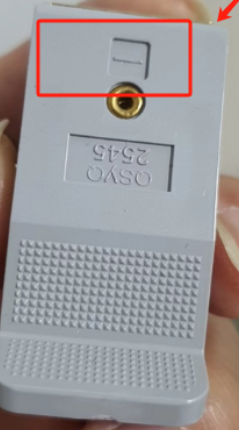
1. The negative terminal of the battery must align with the negative terminal of the clip (as shown in the picture), otherwise the sign will be burned (this will be clearly stated on the product label upon shipment).
2. The sign does not include a battery and cannot be directly connected to a USB charger, otherwise the screen will burn out.
3. The sign requires a battery voltage greater than 3.0V to light up. Insufficient voltage can be increased by connecting the battery in series (rated voltage 5V, generally above 3V will light up, but the battery capacity is too low, and the lighting will be unstable).
4. The sign can only display four Chinese characters or five letters simultaneously.
Benötigen Sie R&D-Unterstützung?
Entdecken Sie wichtige Produktkategorien und verbinden Sie Batteriematerialien mit Canrds R&D-Services.
Experimentelle Materialien
KategorieKathoden, Anoden, Elektrolyte, Separatoren und weitere Materialien für Batterieforschung.
Kathoden-, Anoden- und Elektrolytmaterialien kaufen →Laborgeräte
KategorieBatterielaborgeräte für Pilotlinien, Vorrichtungen und Testabläufe.
Batterielaborgeräte ansehen →Elektroden und Zellen
KategorieKundenspezifische Elektroden, Trockenzellen und Zellkomponenten für R&D-Validierung.
Kundenspezifische Batterieelektroden und Zellen ansehen →Natrium-Elektrolyt
KategorieNatrium-Ionen-Elektrolyte für Natriumbatterieforschung und Validierung.
Natrium-Batterieelektrolyte kaufen →R&D-Services
ServiceGanzheitliche Batterie-R&D-Services von Materialbewertung bis Zellfertigung und Fehleranalyse.
Canrd R&D-Services entdecken →Materialbewertung
ServiceCharakterisierung, elektrochemische Tests und Kompatibilitätsbewertung für Batteriematerialien.
Batteriematerialien bewerten lassen →Elektrodenfertigung
ServiceKundenspezifische Elektrodenblätter und -rollen für Ihre Zielchemie und Prozessanforderungen.
Elektrodenfertigung anfragen →Zellfertigung
ServiceTrockenzellen, montierte Zellen und kundenspezifische Zellformate für R&D-Validierung.
Kundenspezifische Forschungszellen bauen →Kontakt
SeiteCanrd kann Produkte, Materialien und Services passend zu Ihrem Projekt kombinieren.
Produkt- und R&D-Support erhalten →
